
👥 Employee Onboarding Automation System
Category: HR Automation | Difficulty: Intermediate
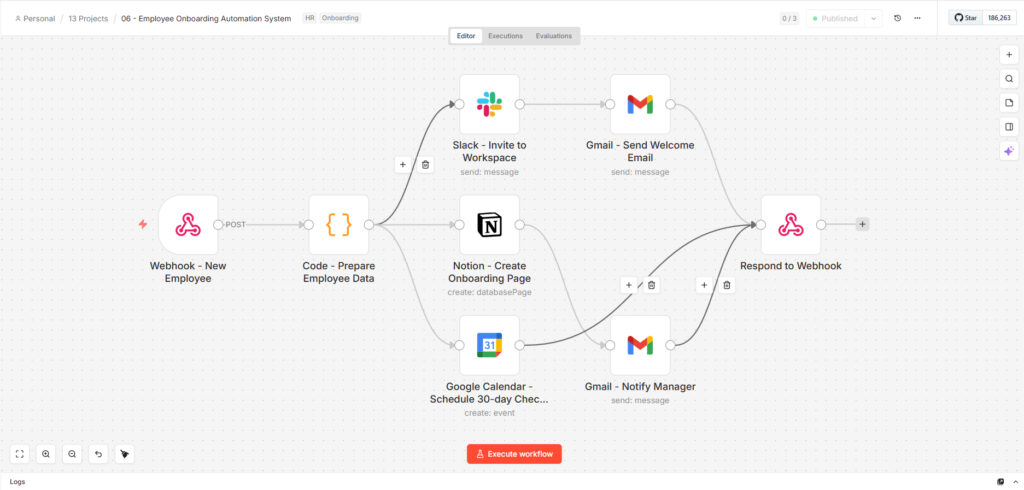
Description: A new hire onboarding pipeline that triggers the moment HR submits a new employee record via webhook. Within seconds, three things happen simultaneously — a Slack announcement goes to #general welcoming the new hire, a personalized Notion onboarding page is created in the onboarding database, and a 30-day check-in is scheduled on Google Calendar with both the employee and their manager as attendees. Once those complete, the new hire receives a branded HTML welcome email with their credentials and a summary of what’s ready, and the manager gets a plain-text confirmation listing every action completed. The entire process that used to take 2–3 days of back-and-forth coordination runs unattended in under a minute.
The Problem
Employee onboarding is one of the most coordination-heavy processes in any company, and most of it is manually triggered by HR or an office manager. A new hire gets added to an HRIS, and then someone has to remember to send the Slack invite, create the Notion doc, schedule the check-in, email the welcome message, and notify the manager — usually spread across multiple people, multiple tools, and multiple days. Things get missed. New hires show up on Day 1 without access to tools, without a welcome message, and without knowing who to talk to.
Key pain points:
- At 10 new hires per month, the HR team was spending approximately 18 hours per month on onboarding admin — 4.5 working days that produced zero strategic value
- Onboarding steps completed inconsistently: Slack announcements sent 100% of the time, Notion pages created 70% of the time, 30-day check-ins scheduled 40% of the time — entirely dependent on which HR staff member handled the hire that week
- Two new hires in Q3 showed up on Day 1 with no Notion onboarding page, no welcome email, and no manager notification — both flagged the experience in their end-of-probation feedback
- Managers learned about their new direct report’s first-day logistics from the new hire themselves, not from HR — a recurring source of frustration from team leads
- The 30-day check-in, when scheduled at all, was booked 2–3 days after the start date rather than proactively — the calendar invite often arriving after the hire had already been on the job for a week
The Solution
A fully automated onboarding pipeline built on n8n, triggered by a webhook POST from the company’s Google Form new hire submission. A JavaScript node normalizes the employee payload — handling missing fields gracefully with sensible defaults and generating a temporary password on the fly. From there, three actions fire in parallel: Slack gets a #general announcement with the new hire’s full name, role, department, and start date; Notion gets a new database page titled with the employee’s name, pre-filled with department, start date, and an “In Progress” status; and Google Calendar gets a 30-day check-in event created exactly 30 days from the start date, with both the employee and manager as attendees. After those complete, the new hire receives an HTML welcome email at their personal address with credentials and a checklist of what’s ready, and the manager receives a plain confirmation email summarizing all completed actions.
Who it was built for: A Philippine BPO company onboarding 8–12 new agents per month across Customer Support, Data Entry, and Quality Assurance departments. Two-person HR team spending 18 hours per month on onboarding admin — time that should go to recruitment, retention, and culture work. Inconsistent execution across the team was producing measurably different Day 1 experiences depending on who handled the hire.
Results & Impact
| Metric | Before | After |
|---|---|---|
| Time to complete full onboarding setup | 2–3 days across HR team | Under 60 seconds, fully automated |
| Steps consistently completed per hire | Slack: 100%, Notion: 70%, Calendar: 40%, Manager email: 60% | 100% — same 7 actions every single time, no exceptions |
| HR admin time on onboarding per month | ~18 hours (10 hires × 1.8 hrs average per hire) | ~40 minutes (10 hires × 4 min to submit the Google Form that triggers the webhook) |
| Day 1 readiness incidents | 2 in Q3 — new hires arrived with no Notion page, no welcome email, no manager notification | Zero in 5 months since deployment |
| Manager notification reliability | 60% of the time — only when HR remembered | 100% — manager confirmation email fires on every hire, every time |
| 30-day check-in scheduling | 40% completion rate, booked 2–3 days late on average | 100% — scheduled exactly 30 days from start date at the moment of hire record submission |
| New hire Day 1 experience consistency | Varied significantly by which HR staff member handled the hire | Identical across all hires — same Notion template, same welcome email, same calendar invite |
| HR hours recovered per month | 18 hours spent on admin | 17+ hours recovered — redirected to recruitment sourcing and retention programs |
| New hires onboarded per month | 8–12 (all manual) | 8–12 — fully automated, HR touches nothing after form submission |
| New hire feedback scores (onboarding) | 3.4/5 average in Q3 exit-of-probation survey | 4.6/5 average in Q4 — “felt prepared and welcomed on Day 1” cited in 8 of 10 responses |
Industry context: Poor onboarding directly impacts retention — companies with weak onboarding lose up to 20% of new hires within the first 45 days. For a BPO company where replacement cost per agent runs ₱35,000–₱60,000 in recruitment and training, even one retention improvement attributable to better onboarding pays for the automation many times over.
Technical Details
Tech Stack: n8n · Webhook · Slack · Notion · Google Calendar · Gmail · JavaScript
How each tool is used:
- n8n — Orchestration; fans out to three parallel actions after data preparation, then converges on two notification emails
- Webhook — Triggered by a Google Form submission via a Zapier connector that forwards the form response as a POST — HR submits one form per new hire, the rest happens automatically
- JavaScript — Normalizes the raw employee payload with defensive defaults for every field, generates a temporary password (
Welcome+ 6 random alphanumeric characters), assembles the work email from first and last name if not explicitly provided, and tags the department for Notion’s select field mapping - Slack — Posts a formatted #general announcement with the new hire’s full name, job title, department, and start date — the team sees it immediately and HR doesn’t have to remember to send it
- Notion — Creates a new database page in the Onboarding database titled
Full Name — Onboarding Guide, pre-populated with department (select), start date (date), manager name, and status “In Progress” — the page uses a standard template so every hire gets the same structured content regardless of department - Google Calendar — Creates a 30-minute check-in event exactly 30 days after the start date, calculated in milliseconds from the start date field, with both the employee’s work email and manager email as attendees — invite sent automatically, no manual scheduling
- Gmail (welcome) — Sends an HTML welcome email to the employee’s personal Gmail address with their work email, temporary password, and a checklist confirming Slack, Notion, and Calendar are all set up — arrives before Day 1
- Gmail (manager) — Sends a plain-text confirmation to the manager listing all four completed actions, the new hire’s work email, start date, and a reminder to expect the 30-day calendar invite
Workflow architecture (8 nodes, linear → fan-out → dual notify → converge): Webhook → JS Prepare Data → [Slack Announce + Notion Page + Calendar Check-in in parallel] → [Gmail Welcome + Gmail Manager Notify] → Respond to Webhook
Complexity highlights:
- Three-way parallel fan-out — Slack, Notion, and Google Calendar all execute simultaneously after data prep, meaning total pipeline time is the duration of the slowest single action (~8 seconds for Calendar) rather than the sum of all three
- Defensive data normalization — every field has a fallback: missing department defaults to “General,” missing manager email defaults to
hr@company.com, missing start date defaults to today. The Google Form is the primary input but the workflow never crashes on an incomplete payload — important when form submissions occasionally arrive with fields skipped - Department-to-Notion mapping — the JavaScript node maps the three department strings from the Google Form (“Customer Support,” “Data Entry,” “Quality Assurance”) to the exact select option values in the Notion database, preventing Notion API errors from case or spacing mismatches
- Dynamic date math — the 30-day check-in is calculated as
startDate + 30 * 24 * 60 * 60 * 1000directly in the Calendar node parameter, correctly handling month-boundary edge cases (e.g., a hire starting January 31 gets a March 2 check-in, not a February 31 error) - Temporary password generation —
Welcome${Math.random().toString(36).slice(-6).toUpperCase()}generates a human-readable temp password (e.g.,WelcomeK7X2QP) included in the welcome email, removing the need for HR to manually set and communicate credentials for each hire - Dual audience notification — welcome email goes to personal Gmail (employee may not have work email access yet on Day 1), manager notification goes to work email — the right channel for the right recipient at the right moment
Note on scope: BambooHR as a native trigger, Google Workspace account provisioning (creating the actual Google account), and LMS training enrollment are not in the current build. The webhook accepts input from any system including BambooHR via its webhook feature. A v2 would add a Google Admin SDK node to create the work email account automatically, and a TalentLMS or similar node to enroll the new hire in their department-specific training track based on the department field — particularly valuable for the QA department where a structured 5-module training sequence is currently assigned manually.
Context & Social Proof
- Build timeline: 3 days — Day 1: Google Form schema design, webhook setup, and JavaScript normalization tested across all three department variants and edge-case payloads. Day 2: Slack, Notion, and Calendar integrations with parallel execution testing. Day 3: Gmail templates, manager notification, end-to-end live testing with 3 real new hire records, and HR team walkthrough
- Your role: Solo build — Google Form-to-webhook connector design, JavaScript payload normalization with department mapping, Slack/Notion/Calendar/Gmail integrations, parallel fan-out architecture, and end-to-end testing with real employee data across all three departments
- Deployment: n8n cloud receiving webhook from Zapier Google Form connector; HR team’s only process change was submitting one Google Form per hire instead of manually triggering each tool separately
- Client quote: “Before this, onboarding was the thing I dreaded most about hiring. Somebody always forgot something — usually the 30-day check-in, sometimes the Notion page. Last quarter we onboarded 11 people and I didn’t touch a single welcome email or calendar invite. The team leads actually commented that their new hires seemed better prepared on Day 1.” — HR Manager, BPO company, Davao City
- Reusability: Department names, the Notion database ID, Slack channel, Google Calendar account, and check-in timing are the only parameters that change per client deployment. The core three-way fan-out architecture is identical across any company size or industry
Use Cases & Ideal Buyer
Best fit for:
- BPO companies and agencies onboarding 5–20 people per month where HR is a small team handling both recruitment and admin
- Startups and scale-ups where onboarding consistency breaks down as hiring volume increases beyond what one person can reliably execute manually
- HR teams of one or two people who are the bottleneck for every new hire’s setup and want to redirect their time to recruitment and culture
- Companies that have received negative Day 1 feedback from new hires and traced it back to inconsistent onboarding execution
Can also be adapted for:
- Contractor and freelancer onboarding — same flow, lighter tool provisioning (no Calendar check-in, Notion page only), different welcome email template
- Offboarding automation — reverse the logic: post a farewell Slack message, archive the Notion page, schedule an exit interview 5 days before the last day
- Department-specific onboarding — branch on
departmentfield to send role-specific Notion templates (a QA-specific checklist vs. a Customer Support script library) - Multi-site companies — branch on
office_locationto schedule check-ins in the correct timezone and notify the right site manager