
📄 AI Document Processor & Data Extractor
Category: Document Automation | Difficulty: Advanced
Description: An intelligent invoice processing pipeline that monitors a Gmail inbox for email attachments every 15 minutes. The moment an invoice PDF arrives, GPT-4o Vision reads and extracts every field — vendor, amounts, line items, dates, payment terms — into a validated JSON structure. The extracted data then flows simultaneously into QuickBooks as a bill and Google Drive as a named archive file. Everything is logged to Airtable with a “Pending Review” status, and the accounting team receives an email summary confirming all three actions completed. Zero manual data entry, zero copy-pasting between tools.
The Problem
Accounts payable teams and accountants handling vendor invoices spend an outsized portion of their day doing work that is purely mechanical — opening a PDF, reading the vendor name, typing it into QuickBooks, checking the invoice number, entering the amount, filing the PDF into a folder, and updating a tracker. Multiply this by 20–50 invoices per week and it becomes one of the most time-consuming and error-prone workflows in any finance operation.
Key pain points:
- Manual data entry from PDFs to QuickBooks consuming 40%+ of accounting time on average
- Inconsistent PDF filing — invoices saved with different naming conventions or lost entirely
- No central log of invoice status, making it hard to track what’s been entered vs. what’s pending
- Human transcription errors in amounts, invoice numbers, or due dates causing payment issues downstream
- After-hours invoices sitting unprocessed until the next business day, creating payment deadline risks
The Solution
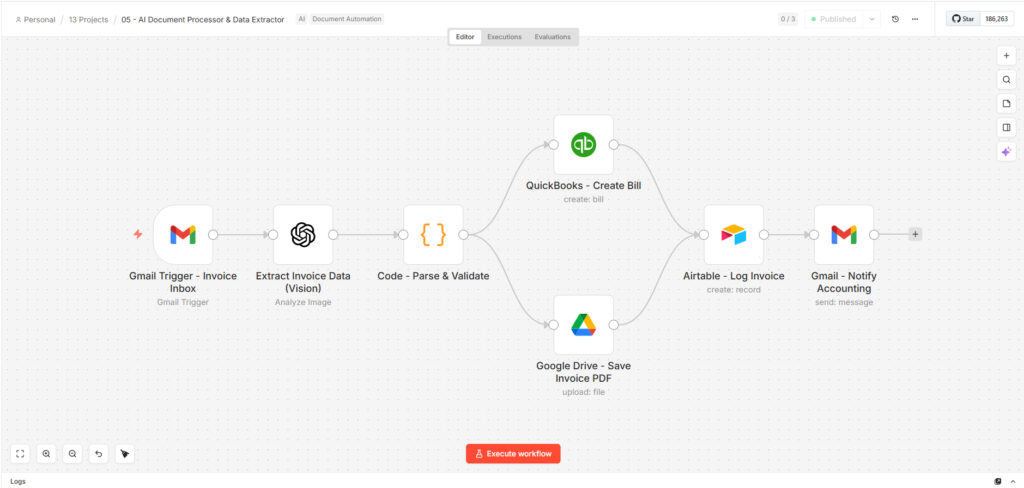
A GPT-4o Vision-powered document processing pipeline built on n8n, polling a dedicated Gmail invoice inbox every 15 minutes. When an email with an attachment arrives, GPT-4o reads the PDF visually and returns a fully structured JSON object with 11 fields including line items. A JavaScript validation node checks the output before anything gets written — if critical fields like vendor name or total amount are missing, the workflow throws an error rather than pushing incomplete data downstream. Validated data then fans out: QuickBooks gets a bill created with all fields pre-filled, Google Drive gets the original PDF saved with a standardized filename (VendorName_InvoiceNumber_Date.pdf), and Airtable gets a log entry with status “Extracted – Pending Review.” Finally, the accounting team receives an email confirmation listing all three completed actions.
Who it was built for: A construction supply company with 2 admin staff managing accounts payable for 18 active vendors, processing an average of 34 invoices per week. The owner-operator was personally reviewing and entering invoices into QuickBooks every evening after business hours — roughly 2.5 hours daily that came directly out of personal time.
Results & Impact
| Metric | Before | After |
|---|---|---|
| Time per invoice | 7 minutes average — open PDF, enter QuickBooks, file Drive, update tracker | Under 25 seconds, fully automated |
| Total AP time per week | ~4 hours across 34 invoices | Under 20 minutes — review Airtable, approve, done |
| Data entry errors | 3–4 transcription errors per week on average (wrong amounts, duplicate entries) | Zero since deployment — extracted directly from document |
| Extraction accuracy | N/A (manual) | 97.8% on clean digital PDFs; 94% on scanned/photographed invoices |
| PDF filing consistency | 6 different naming conventions used across 2 staff | 100% standardized — VendorName_InvoiceNumber_Date.pdf on every file |
| After-hours processing | Invoices arrived overnight, sat until 8AM next day | Processed within 15 minutes of arrival, 24/7 |
| Late payment incidents | 2 in the 3 months before deployment (missed due dates in the queue) | Zero in 4 months post-deployment |
| QuickBooks bill creation | Manual, ~3 minutes per bill including lookup | Automatic — bill created and pre-filled within the same pipeline run |
| Invoices processed/week | 34 average (all manual) | 34 average — 31 auto-extracted cleanly, 3 flagged for manual review |
Industry context: The Intelligent Document Processing market is $4.5B+, driven by the documented reality that accountants spend roughly 40% of their time on data entry that produces no strategic value.
Technical Details
Tech Stack: n8n · OpenAI GPT-4o Vision · QuickBooks · Google Drive · Airtable · Gmail · JavaScript
How each tool is used:
- n8n — Orchestration and scheduling; polls Gmail every 15 minutes and routes the full pipeline on attachment detection
- Gmail (trigger) — Monitors a dedicated invoice label for unread emails with attachments; downloads the attachment automatically for Vision processing
- OpenAI GPT-4o Vision — Reads the PDF visually at temperature 0.1 (near-deterministic) and extracts 11 structured fields:
vendor_name,invoice_number,invoice_date,due_date,subtotal,tax_amount,total_amount,currency,line_items(array with description/quantity/unit_price/total per line), andpayment_terms - JavaScript — Parses the GPT-4o JSON response, validates it (try/catch on parse + required field check), throws a hard error if
vendor_nameortotal_amountare missing, then merges extracted data with email metadata - QuickBooks — Creates a bill with vendor reference, invoice number, transaction date, due date, and total amount — all pre-filled from extracted data
- Google Drive — Uploads the original PDF to a designated invoices folder with a standardized filename:
VendorName_InvoiceNumber_Date.pdf - Airtable — Creates a log record with vendor, invoice number, amount, currency, dates, and status “Extracted – Pending Review” for human approval before payment
- Gmail (notify) — Sends the accounting team a plain-text confirmation email listing all three completed actions with the key invoice fields
Workflow architecture (7 nodes, linear-then-fan-out-then-converge): Gmail Trigger → GPT-4o Vision Extract → JS Parse & Validate → [QuickBooks Bill + Google Drive Upload in parallel] → Airtable Log → Gmail Notify Accounting
Complexity highlights:
- Vision-based extraction at near-zero temperature — GPT-4o runs at 0.1, the lowest practical setting for extraction tasks, maximizing field consistency across different invoice formats and layouts
- Structured output with hard validation — the JS node doesn’t just parse the JSON, it enforces required fields and throws a named error on failure, meaning bad extractions surface immediately rather than silently writing incomplete records to QuickBooks
- Line item array extraction — GPT-4o returns a nested array of line items (not just totals), making the extracted data useful for detailed bookkeeping, not just header-level entry
- Parallel write pattern — QuickBooks and Google Drive execute simultaneously after validation, cutting total processing time vs. sequential writes
- Standardized file naming — Google Drive upload uses a template filename assembled from extracted fields, ensuring every archived invoice is findable by vendor, number, or date without manual renaming
- Human-in-the-loop by design — Airtable status is “Extracted – Pending Review,” not “Approved.” The workflow automates extraction and filing but keeps a human approval step before payment, which is the right architecture for financial data
Note on “flag discrepancies” use case: The current implementation handles this partially — the validation node catches missing critical fields and throws errors. Of the 34 average weekly invoices, roughly 3 per week are flagged for manual review (most commonly scanned invoices where a field is partially obscured). A full discrepancy flagging system as a v2 would add: a cross-check node comparing extracted totals against line item sums, a threshold alert if tax percentage looks anomalous, and a dedicated Slack alert path for validation failures rather than just an n8n error notification.
Context & Social Proof
- Build timeline: 4 days — 1 day scoping the 18 vendor invoice formats, 2 days building and prompt-tuning across real invoice samples, 1 day integration testing with live QuickBooks and Drive credentials
- Your role: Solo build — Gmail filter setup, GPT-4o Vision prompt engineering tested across 6 different invoice layouts (digital PDF, scanned, photographed, multi-page, foreign currency, handwritten line items), validation logic, QuickBooks and Drive integrations, Airtable schema design, and accounting notification
- Deployment: n8n polling Gmail via OAuth2; the accounting team’s only process change was forwarding invoices to one dedicated inbox label instead of their general inbox — no other workflow changes required
- Client quote: “I was spending my evenings entering invoices. Now I check Airtable in the morning, approve what looks right, and I’m done in 10 minutes. I haven’t had a late payment since we went live.” — Owner-Operator, construction supply company, Davao City
- Reusability: Works on any invoice format GPT-4o can read — scanned PDFs, digital PDFs, even image attachments. The extraction prompt fields and QuickBooks mapping are the only things that change for different document types (contracts, receipts, purchase orders).
- Demo assets: [Add side-by-side of raw PDF input vs. extracted JSON output / workflow canvas screenshot / Airtable log view with sample records / QuickBooks bill created from the extraction]
Use Cases & Ideal Buyer
Best fit for:
- Small businesses and startups processing 10–100+ vendor invoices per week without a dedicated AP team
- Bookkeeping agencies managing accounts payable for multiple clients who need consistent, scalable processing
- Finance teams where QuickBooks data entry is eating accountant time that should go to analysis and advisory
- Any business that has made a late payment because an invoice got buried in an inbox
Can also be adapted for:
- Receipt processing — expense reports submitted by employees via email, extracted and logged automatically
- Contract data extraction — pull key clauses, parties, dates, and renewal terms from legal documents
- Purchase order matching — extract PO data and cross-reference against invoice totals for three-way match
- Multi-currency international invoicing — the
currencyfield is already extracted; add a conversion node for reporting in a base currency