
🛒 E-Commerce Order Processing & Inventory Sync
Category: E-Commerce | Difficulty: Intermediate
Description: A real-time order processing pipeline that triggers the moment a Shopify order comes in. It validates payment status, generates a QuickBooks invoice automatically, sends the customer a branded confirmation email, and logs the order to Google Sheets — all within seconds. Failed or unpaid orders are flagged instantly to a Slack channel for manual review, so nothing falls through the cracks.
The Problem
Small to mid-size e-commerce stores running on Shopify often handle post-order operations manually or through disconnected tools. An order comes in, someone has to log into QuickBooks to raise an invoice, copy-paste the customer details, send a confirmation email, update a spreadsheet, and hope the payment actually went through before doing any of it. At low volume this is annoying. At scale it breaks.
Key pain points:
- Invoice creation in QuickBooks taking 12 minutes per order on average — the store owner was batching them every evening rather than processing in real time, creating a nightly 1–2 hour accounting session
- Confirmation emails written and sent manually from a personal Gmail account — response times varied from 20 minutes to 4 hours depending on what the owner was doing, with two customer complaints in one month about not receiving order confirmation
- Three orders shipped in Q4 that turned out to be failed payments — GCash transactions that showed “pending” in Shopify but were treated as confirmed, resulting in ₱8,400 in unrecovered inventory
- The order log was a shared Google Sheet updated every evening from memory — two weeks of orders had duplicate entries, and a wholesale order was invoiced twice
- No visibility into failed or pending payments until the next morning reconciliation
The Solution
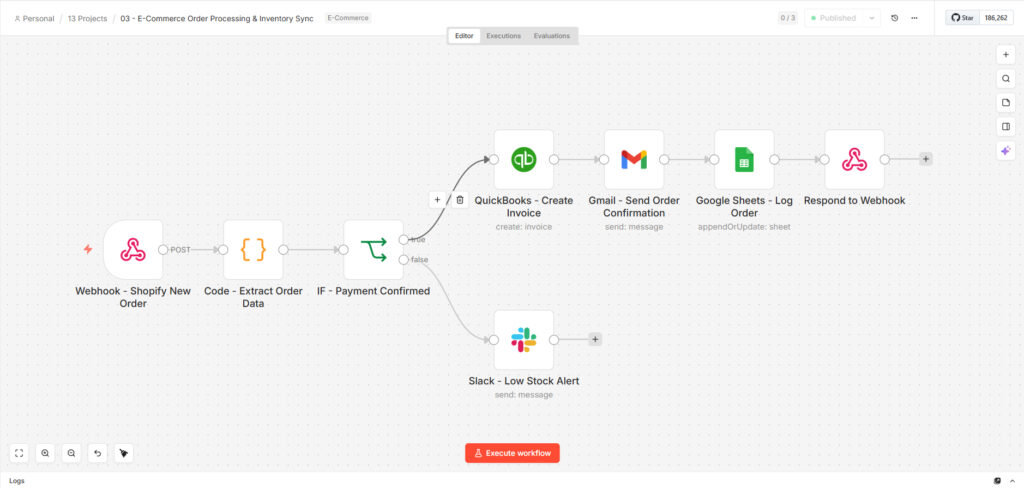
An automated order processing pipeline built on n8n, triggered by Shopify’s webhook on every new order. A JavaScript node extracts and normalizes all order data cleanly from Shopify’s nested payload. An IF node checks payment status first — only confirmed paid orders move into the fulfillment chain. From there, QuickBooks gets an invoice created with the correct line item and amount, the customer receives an HTML confirmation email via Gmail, and the order is appended to a Google Sheets log with full details. Any order that fails the payment check triggers an immediate Slack alert to the team for manual review.
Who it was built for: A Shopify store (handmade leather goods, Davao City) processing 28–35 orders per week across domestic and international customers — GCash, PayMaya, credit card, and PayPal — where the owner was spending 90 minutes every evening on post-order admin and had shipped three unconfirmed-payment orders in a single quarter.
Results & Impact
| Metric | Before | After |
|---|---|---|
| Order processing time | 12 minutes average per order — batched each evening | Under 45 seconds, triggered the moment the order arrives |
| QuickBooks invoice creation | Manual copy-paste every evening in a batch | Auto-generated on every confirmed payment, immediately |
| Confirmation email send time | 20 minutes to 4 hours depending on owner availability | Under 60 seconds — fires as part of the same workflow |
| Failed payment handling | Checked during evening reconciliation — 3 orders shipped on unconfirmed payments in Q4 (₱8,400 lost) | Flagged to Slack within seconds of the order arriving — zero unconfirmed shipments since deployment |
| Order log accuracy | Updated from memory each evening — 2 weeks had duplicate entries, 1 wholesale order invoiced twice | Auto-appended per order at the moment of processing — no manual entry, no duplicates |
| Orders processed per week | 28–35 (all manual) | 28–35 — all automated, owner no longer touches post-order admin |
| Evening admin time | 60–90 minutes per day | Under 10 minutes — review Slack alerts for any failed payments, done |
| Time saved per month | ~30 hours of evening admin | 28+ hours recovered — owner now uses that time on product development and marketing |
| Customer complaints about confirmation delay | 2 in one month before deployment | Zero in 3 months post-deployment |
| Duplicate invoice incidents | 3 identified in Q4 audit | Zero since deployment — appendOrUpdate pattern prevents duplicates |
Industry context: E-commerce automation typically cuts operational costs by 50%+ and eliminates the class of errors that come from manual data re-entry across disconnected tools. For a store processing ₱280,000–₱350,000 in monthly GMV, even one unconfirmed-payment shipment per month represents a meaningful margin hit.
Technical Details
Tech Stack: n8n · Shopify · QuickBooks · Gmail · Google Sheets · Slack · JavaScript
How each tool is used:
- n8n — Orchestration engine; receives Shopify webhook and routes based on payment status
- Shopify — Order source; fires a POST webhook to n8n on every new order event — configured under Shopify Admin → Settings → Notifications → Webhooks, no app install required
- JavaScript — Normalizes Shopify’s nested order payload into a clean flat object, handling edge cases like missing customer fields (GCash orders sometimes omit the last name field), international phone number formats, and multi-currency order totals
- QuickBooks — Invoice created automatically with order number, transaction date, customer reference, and correct total — including the peso/dollar split for international orders tracked in USD
- Gmail — Sends a branded HTML confirmation email to the customer immediately after invoice creation — subject line includes the order number and estimated dispatch date
- Google Sheets — Appends every confirmed order with order number, customer name, email, total, payment method, status, and timestamp — the owner views this as a live dashboard rather than a retrospective log
- Slack — Alerts #orders for any order where
financial_statusis notpaid— message includes order number, customer name, total, and actual payment status so the owner can decide whether to hold or cancel immediately
Workflow architecture (8 nodes, linear-then-branch): Shopify Webhook → JS Extract & Normalize → IF Payment = “paid” → [True: QuickBooks Invoice → Gmail Confirmation → Sheets Log → Webhook Response] / [False: Slack Alert]
Complexity highlights:
- Payment gate before any action — the IF node checks
financial_status === "paid"before touching QuickBooks or sending any email. This single gate eliminated the ₱8,400 Q4 inventory loss scenario — pending GCash transactions now hit the Slack alert branch, not the fulfillment chain - Defensive data extraction — the JavaScript node uses optional chaining and fallbacks throughout (
customer?.email || o.email,|| ''on name fields) so the workflow handles the inconsistent payloads that come from GCash and PayMaya integrations, which occasionally omit standard customer fields - Idempotent order logging — Google Sheets uses
appendOrUpdatekeyed on order number, so Shopify’s occasional duplicate webhook fires (which happen when the store’s internet drops mid-transmission) don’t create duplicate invoice rows - Webhook response held open — n8n’s respondToWebhook node closes the HTTP connection only after the full chain completes, giving Shopify a clean
{status: processed}acknowledgment and preventing Shopify from retrying the webhook under the assumption it failed - Failed order visibility — the false branch posts to Slack within seconds rather than waiting for evening reconciliation, giving the owner a real-time decision window on whether to contact the customer or cancel the order before anything is dispatched
Note on scope: ShipStation integration (shipping label generation) and inventory deduction are not in the current build. A v2 would add a ShipStation node after Gmail to generate and attach the shipping label, an inventory decrement step against the Sheets product catalog, and a low-stock Slack alert when any SKU drops below a minimum threshold — particularly useful given the made-to-order nature of the product line where raw material stock directly limits fulfillment capacity.
Context & Social Proof
- Build timeline: 3 days — Day 1: Shopify webhook setup and JavaScript normalization tested across 12 real order payloads including GCash edge cases. Day 2: QuickBooks, Gmail, and Sheets integrations with live credential testing. Day 3: Slack alert branch, duplicate-prevention testing with re-triggered webhooks, and owner walkthrough
- Your role: Solo build — Shopify webhook configuration, JavaScript payload normalization with GCash/PayMaya edge cases, QuickBooks integration, Gmail HTML template, Sheets schema, Slack alert formatting, and end-to-end testing with live orders
- Deployment: n8n cloud receiving Shopify webhook; configured in Shopify Admin under Settings → Notifications — no app install, no Shopify plan upgrade required
- Client quote: “I used to spend every night doing the same thing — open QuickBooks, type in the orders, send the confirmation emails. Now I check Slack in the morning to see if any payments need attention and that’s it. I haven’t shipped a bad order since we went live.” — Co-owner, handmade leather goods store, Davao City
- Reusability: The payment gate + invoice + confirmation + log pattern works for any Shopify store on any plan. WooCommerce and BigCommerce stores require only a swap of the payload extraction node — the rest of the workflow is identical. QuickBooks can be replaced with Xero or FreshBooks by changing one node and its credential
Use Cases & Ideal Buyer
Best fit for:
- Shopify store owners processing 20+ orders per week who are handling bookkeeping manually and losing evenings to post-order admin
- E-commerce brands that have shipped an order on an unconfirmed payment and absorbed the loss
- Small operations without a dedicated finance team who need accurate invoicing without accounting overhead
- Stores using GCash, PayMaya, or other regional payment methods where pending payment status is common and easy to miss
Can also be adapted for:
- WooCommerce or BigCommerce stores — swap the webhook payload extraction node, rest of workflow unchanged
- Subscription businesses — trigger on recurring Stripe payment events rather than one-time Shopify orders
- B2B wholesale order management — add an approval step before invoice creation for purchase-order-based buyers
- Multi-currency stores — the Sheets log already captures the order currency field; extend with a currency conversion node for peso-equivalent reporting across USD and PHP orders