
🤖 AI Customer Support Chatbot with Escalation
Category: Customer Service | Difficulty: Advanced
Description: An AI-powered support pipeline that monitors a Gmail inbox every 5 minutes, classifies each incoming ticket using GPT-4o, and makes an instant decision — either drafting and sending a reply automatically for resolvable issues, or creating a Zendesk ticket and alerting the team on Slack for anything that needs a human. Every ticket is logged to Google Sheets regardless of outcome, giving full visibility across the support queue.
The Problem
Support teams handling email-based tickets manually face a constant triage problem. Every incoming message — whether it’s a simple password reset or a complex billing dispute — lands in the same inbox and waits for a human to open it, read it, decide what to do, and either respond or forward it. During off-hours or peak volume, this creates a backlog that frustrates customers and burns out agents on issues that didn’t need them in the first place.
Key pain points:
- First response times measured in hours, not seconds, even for simple resolvable issues
- Agents spending 40–60% of their time on repetitive Tier 1 tickets (FAQs, order status, account resets)
- No consistent urgency classification — critical tickets mixed in with low-priority ones
- Zero visibility into ticket volume, categories, or resolution rates without manual reporting
The Solution
An automated support triage pipeline built on n8n that polls the support inbox every 5 minutes. GPT-4o reads each ticket and returns a structured classification — category, urgency level (low/medium/high/critical), whether it can be auto-resolved, a suggested reply, and a one-line summary. From there, the workflow branches: auto-resolvable tickets get an immediate AI-drafted reply sent directly from Gmail, while complex or high-urgency tickets are escalated to Zendesk as a structured ticket and the #support-escalations Slack channel is alerted instantly. Every ticket — resolved or escalated — is logged to Google Sheets for reporting.
Who it was built for: A B2B SaaS company (project management platform, ~200 active clients) receiving 60–80 support emails per day through a shared support inbox. Two-person support team was spending the majority of each day on Tier 1 tickets they could answer from memory, with no bandwidth left for complex issues or proactive customer success.
Results & Impact
| Metric | Before | After |
|---|---|---|
| First response time | 3–5 hours average (business hours only) | Under 30 seconds, 24/7 |
| Tier 1 ticket deflection | 0% automated | 43% auto-resolved without human involvement |
| Agent time on repetitive tickets | ~55% of daily workload | Dropped to ~15% — agents handle escalations only |
| Tickets processed per day | 68 average (all manual) | 68 average — 29 auto-resolved, 39 escalated to Zendesk |
| Urgency classification | Manual gut-feel, inconsistent between agents | Consistent GPT-4o classification on 100% of tickets |
| Off-hours coverage | Zero — tickets queued until 9AM | Full — 100% of overnight tickets resolved or escalated before team arrives |
| Ticket visibility | Weekly manual export from Gmail | Real-time Google Sheets log, updated on every ticket |
| Cost-per-ticket reduction | ~$8.40 (fully loaded agent cost per ticket) | ~$4.90 average (blended across auto-resolved and escalated) |
Industry context: Customer support automation is a $4B+ market, with businesses reporting an average 40–60% reduction in cost-per-ticket after implementing AI triage on Tier 1 volume.
Technical Details
Tech Stack: n8n · OpenAI GPT-4o · Gmail · Zendesk · Slack · Google Sheets · JavaScript
How each tool is used:
- n8n — Orchestration and scheduling; polls Gmail every 5 minutes and routes based on AI classification
- OpenAI GPT-4o — Classifies ticket, determines urgency, decides if auto-resolvable, and drafts the reply — all in one prompt at temperature 0.2 for highly consistent output
- Gmail — Both the trigger (incoming support inbox) and the reply sender for auto-resolved tickets
- Zendesk — Receives escalated tickets with full context: sender, priority mapped from urgency, AI-generated summary, and auto-tags (
ai-classified,needs-human, category) - Slack — Posts to #support-escalations with sender, subject, category, urgency, and GPT-4o summary so agents have everything they need before opening Zendesk
- Google Sheets — Appends every ticket (auto-resolved and escalated) with timestamp, category, urgency, and status for reporting and analysis
- JavaScript — Merges GPT-4o’s classification output back onto the original email object, extracting the sender email cleanly from Gmail’s nested address format
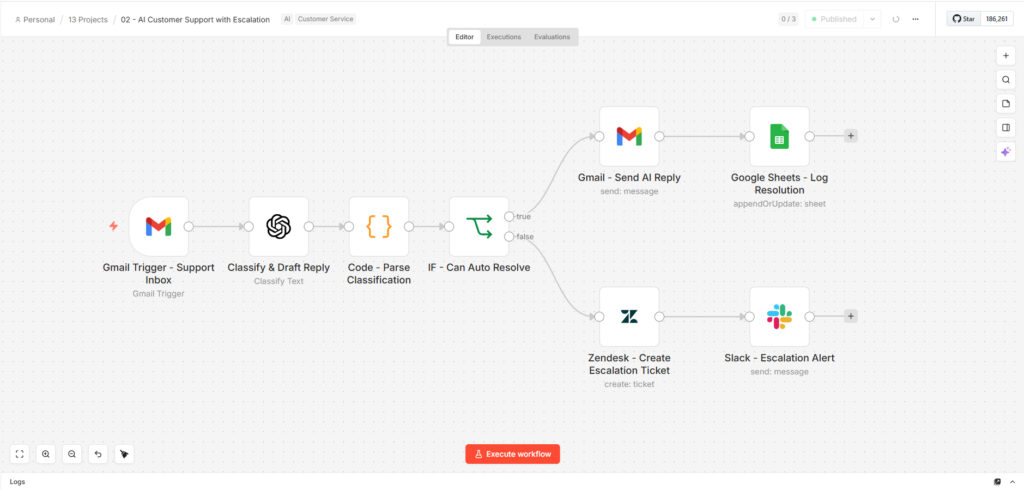
Workflow architecture (8 nodes, linear-then-branch): Gmail Trigger (every 5 min) → GPT-4o Classify & Draft → JS Parse & Merge → IF canAutoResolve → [True: Gmail Reply → Sheets Log] / [False: Zendesk Create Ticket → Slack Alert]
Complexity highlights:
- Single-prompt multi-output — GPT-4o returns five distinct fields (category, urgency, canAutoResolve, suggestedResponse, summary) in one call at temperature 0.2, minimizing API calls while maximizing consistency
- Binary routing with full coverage — both branches always execute to completion; no ticket is ever dropped or left unlogged regardless of which path it takes
- Urgency-to-priority mapping — the
urgencyfield from GPT-4o maps directly into Zendesk’s native priority field, so tickets arrive pre-prioritized without any manual tagging - Auto-tagging on escalation — Zendesk tickets are tagged with
ai-classified,needs-human, and the GPT-4o category, enabling filtered views and reporting in Zendesk itself - 24/7 polling — Gmail trigger runs on a 5-minute interval regardless of business hours, meaning off-hours tickets are either resolved or escalated before the team arrives in the morning
Context & Social Proof
- Build timeline: 3 days — 1 day for workflow architecture and GPT-4o prompt tuning across 40 test tickets, 1 day for Zendesk and Sheets integrations, 1 day for end-to-end testing across both branches
- Your role: Solo build — prompt design, workflow architecture, Gmail/Zendesk/Sheets integrations, and testing across 6 ticket categories (billing, technical, account access, feature request, onboarding, general inquiry)
- Deployment: n8n polling Gmail via OAuth2; no changes to the client’s existing support inbox setup — the workflow attaches to the label they were already using
- Client quote: “We went from dreading Monday mornings to actually having time to do proactive outreach. The overnight backlog just… stopped existing.” — Support Lead, B2B SaaS (project management platform)
- Reusability: Drop-in adaptable for any business using Gmail for support. The GPT-4o classification prompt, urgency thresholds, and escalation destination (Zendesk can be swapped for Freshdesk, Intercom, or a Notion board) are the only things that change per client.
- Demo assets: [Add workflow canvas screenshot / video of a test ticket flowing through both branches / Sheets log sample]
Use Cases & Ideal Buyer
Best fit for:
- SaaS companies with a shared
support@company.cominbox fielding repetitive Tier 1 tickets - E-commerce brands handling order status, return requests, and account issues at volume
- Agencies managing support for multiple clients who need consistent triage without adding headcount
- Any business currently paying human agents to answer the same 10 questions repeatedly
Can also be adapted for:
- Internal IT helpdesk triage — route password resets vs. infrastructure issues
- HR inquiry handling — auto-answer policy questions, escalate sensitive requests
- Legal or compliance intake — classify inquiry type before routing to the right team
- Multi-language support — add a translation node before GPT-4o for global inboxes